
How to Use?
System Requirements:
OS:Compatible with XP, Vista, Win7, Win8
RAM: 1024MB or greater, executable program takes 27Mb, loaded with a drawing file will take more RAM depends on the size of drawing file.
HD: 40MB free hard drive spaces to install
Attribute Extractor
AutoDWG Attribute Extractor is for batch extracting of attribute data from AutoCAD attribute blocks without running AutoCAD. Most DWG formats are supported including AutoCAD R9 – 2027.
Steps to do the conversion
Step 1: Please double click the desktop shortcut to open the program, and create or open a attribute extraction project
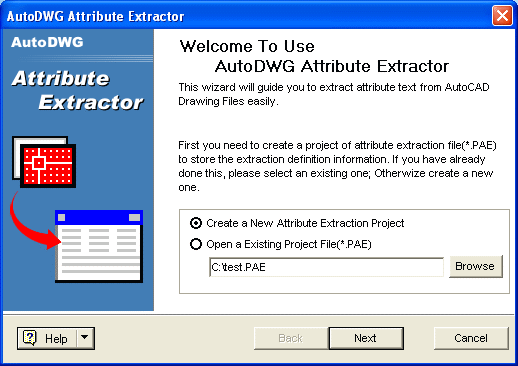
Step 2: Define the attribute tag to be extracted
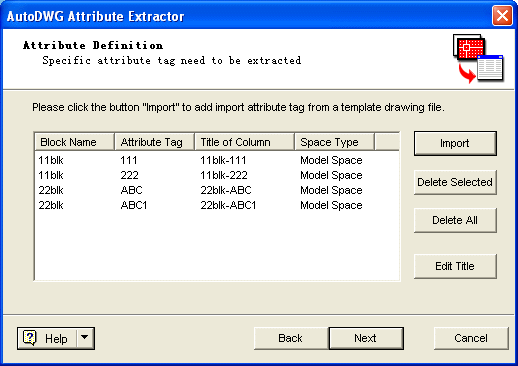
To make it easy, you can select attribute tags from an existing template drawing file, click button "Import".
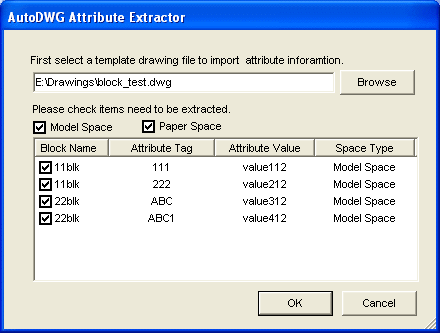
First select a template drawing file, AutoDWG Attribute Extractor will enumerate all blocks and attribute tags in the drawing. Check the block name and the attribute tags, press OK, all attribute tags you select will be listed in the Wizard.
Step 3: Add DWG/DXF Files to be extracted
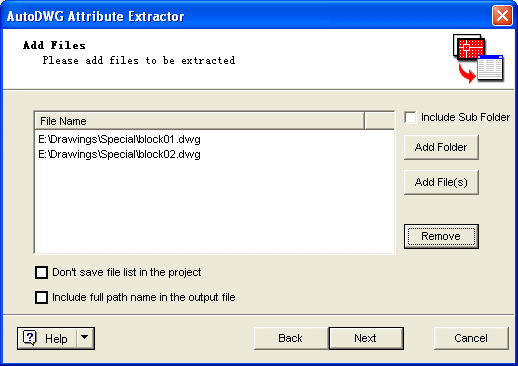
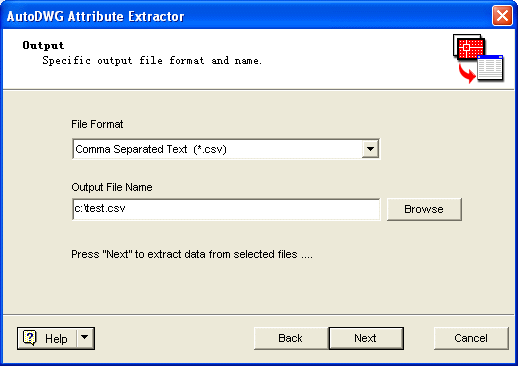
Step 4: Specify the output format and file name, then click the “Next” button to extract attribute.
FAQ:
| Will this software work with 64 bit computer? |
| How to update the product? |
| How to download the old program? |
Reference:
System Requirements:
OS:Compatible with XP, Vista, Win7, Win8, Win10
RAM: 1024MB or greater, executable program takes 27Mb, loaded with a drawing file will take more RAM depends on the size of drawing file.
HD: 40MB free hard drive spaces to install
Technical Support:
Free technical support is available to all customers, any question please contact: info@autodwg.com.
Update:
You’ll enjoy one year free update service since you buy the software. After expiry, you can continue using the software but no more updates will be available unless you purchase.